Shelf workflow
Shelves sit inside the usable cabinet compartment. Choose quantity and type first, then use equal spacing or enter individual positions and depths.
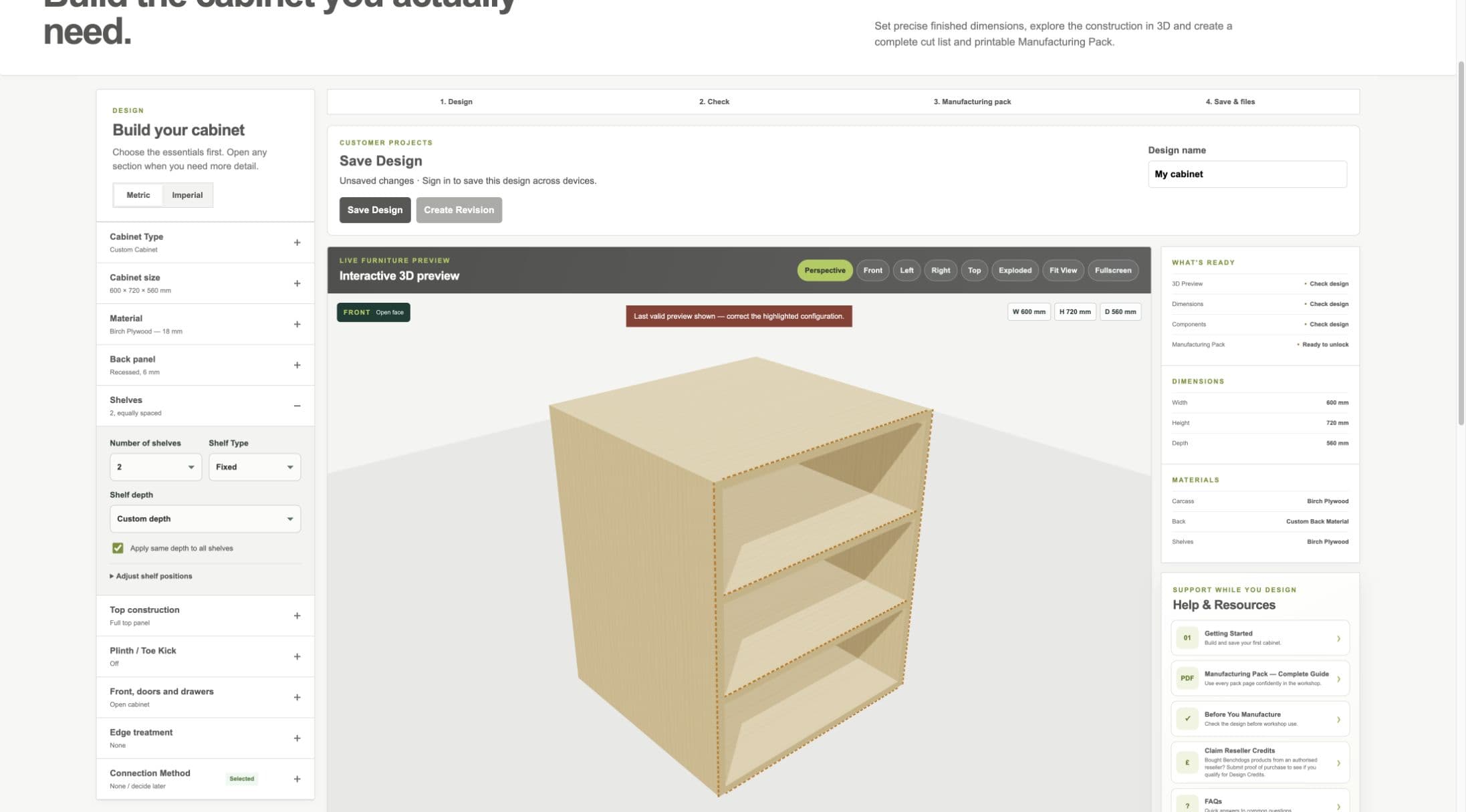
Current staging workflow: custom shelf depth is measured forward from the rear usable datum.
- Shelves section
- Quantity, type and depth
- Shelves in preview
Shelf quantity and equal spacing
- WHAT IS IT?
- The number of internal shelf panels and their initial distribution.
- WHEN WOULD I USE IT?
- Use equal spacing for a quick balanced starting layout.
- WHAT DOES IT CHANGE?
- Part count, shelf positions, material quantities, 3D, cut list and drawings.
- HOW DO I SET IT?
- Choose the number of shelves; use Reset to equal spacing whenever you want to redistribute them.
- EXAMPLE
- Two shelves divide the usable height into three approximately equal spaces.
Manual positioning
- WHAT IS IT?
- An individual lower-face height measured from the cabinet bottom.
- WHEN WOULD I USE IT?
- Use when stored items need unequal clearances.
- WHAT DOES IT CHANGE?
- The shelf position, joining/support intent, 3D and manufacturing outputs.
- HOW DO I SET IT?
- Open Adjust shelf positions and enter each shelf height.
- EXAMPLE
- Move the upper shelf higher to make room for a tall appliance below.
Fixed and Adjustable
- WHAT IS IT?
- Fixed shelves are permanent construction parts; adjustable shelves sit on suitable supports or pins.
- WHEN WOULD I USE IT?
- Use Fixed for bracing or permanent compartments and Adjustable when the customer may reposition storage.
- WHAT DOES IT CHANGE?
- Connection/support intent and the shelf-pin requirement.
- HOW DO I SET IT?
- Choose Shelf Type and switch shelf pin holes on when appropriate for adjustable shelves.
- EXAMPLE
- An adjustable larder shelf can move between validated support positions.
Workshop / Advanced Note
Select supports suitable for the material, span and load and follow their manufacturer instructions.
Full Depth, Custom Depth and individual depths
- WHAT IS IT?
- Full Depth reaches the usable front extent. Custom Depth is measured from the rear usable datum forward.
- WHEN WOULD I USE IT?
- Use a shorter shelf where front clearance is required or use individual depths for different storage levels.
- WHAT DOES IT CHANGE?
- Shelf geometry, cut size, support intent, 3D, quantities, drawings and manufacturing identity.
- HOW DO I SET IT?
- Choose Custom depth, decide whether one value applies to all shelves, then enter each required depth.
- EXAMPLE
- With 540 mm usable depth and a 400 mm shelf, 140 mm remains clear at the front—not behind the shelf.
Shelf edge treatment
- WHAT IS IT?
- The selected finish on particular shelf edges.
- WHEN WOULD I USE IT?
- Use when a visible or handled shelf edge needs banding.
- WHAT DOES IT CHANGE?
- The edge schedule and material requirements, but not V1 calculated cut size.
- HOW DO I SET IT?
- Use Edge Treatment and select the intended shelf edge; no selection means no treatment.
- EXAMPLE
- Band the front edge of an adjustable shelf and leave concealed edges untreated.