Backs and the rear usable datum
The rear usable datum is the line from which usable cabinet depth begins. A back, recess or service void can move this line forwards. Rear-aligned shelves and drawer depth limits use this datum.
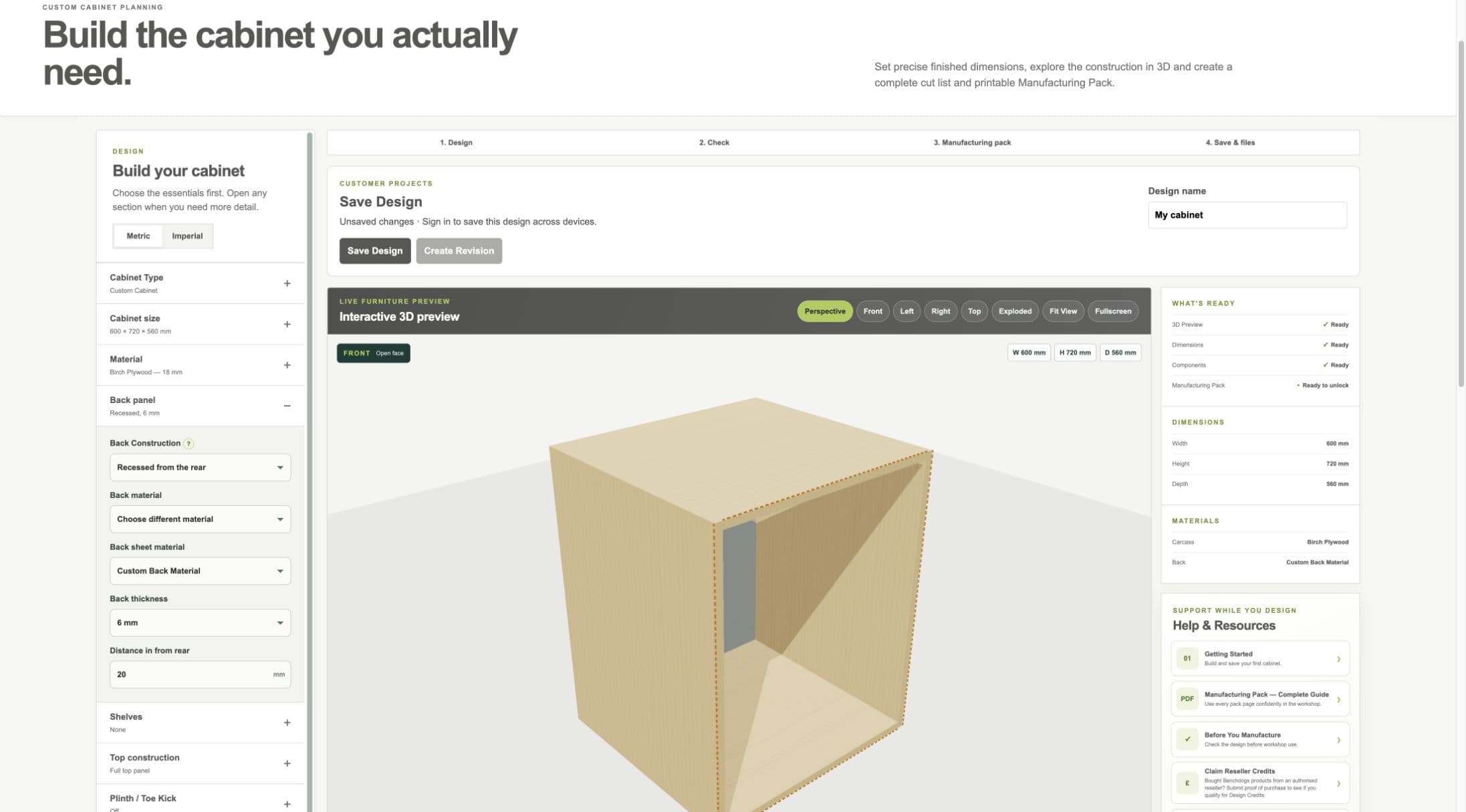
Current staging workflow: back construction changes the rear usable datum and therefore usable depth.
- Back panel section
- Construction and recess controls
- Rear panel in preview
No Back
- WHAT IS IT?
- The rear of the cabinet is left open.
- WHEN WOULD I USE IT?
- Use only where the installation genuinely needs an open rear and the cabinet remains adequately fixed and braced.
- WHAT DOES IT CHANGE?
- Removes the back panel and its material from the model.
- HOW DO I SET IT?
- Choose No back in Back Construction.
- EXAMPLE
- An installation cabinet that must remain open for access.
Applied Back
- WHAT IS IT?
- A panel fixed onto the outside rear of the carcass.
- WHEN WOULD I USE IT?
- Use for a simple rear closure where an external applied panel suits the construction.
- WHAT DOES IT CHANGE?
- Adds a back panel behind the carcass without moving the internal rear datum forward by a recess.
- HOW DO I SET IT?
- Choose Applied to the rear, then choose back material and thickness.
- EXAMPLE
- A 6 mm back fixed across the rear edges.
Recessed / Rebated Back
- WHAT IS IT?
- A back positioned in from the rear, including the supported grooved/rebated intent.
- WHEN WOULD I USE IT?
- Use when the back must sit within the carcass or leave a service space behind it.
- WHAT DOES IT CHANGE?
- Moves the rear usable datum, reduces usable internal depth and updates shelves, drawers, cut list and drawings.
- HOW DO I SET IT?
- Choose Recessed from the rear or Grooved / rebated, enter the recess and select the actual back stock.
- EXAMPLE
- A back recessed 20 mm leaves a service zone behind it and moves rear-aligned shelves forward.
Workshop / Advanced Note
A groove is a channel cut into a part. A rebate is a step removed from an edge. Confirm the exact cutter, groove and rebate setup from the chosen workshop method; the preview is not a cutter-setting instruction.
Back material and thickness
- WHAT IS IT?
- The separate stock used for the back panel.
- WHEN WOULD I USE IT?
- Use a different selection when the back is not made from carcass stock.
- WHAT DOES IT CHANGE?
- Back geometry, material grouping, quantities, cut list, drawings and manufacturing identity.
- HOW DO I SET IT?
- Choose Same as carcass or Choose different material, then select its thickness.
- EXAMPLE
- An 18 mm birch plywood carcass with a 6 mm plywood back.